
Companies no longer print, sign, scan and send documents through emails for completing standard business transactions. E-signatures speed up approvals — whether that’s hiring someone, closing a contract, approving an invoice or wrapping up a service agreement. But that convenience only counts for something if the signing process actually holds up.
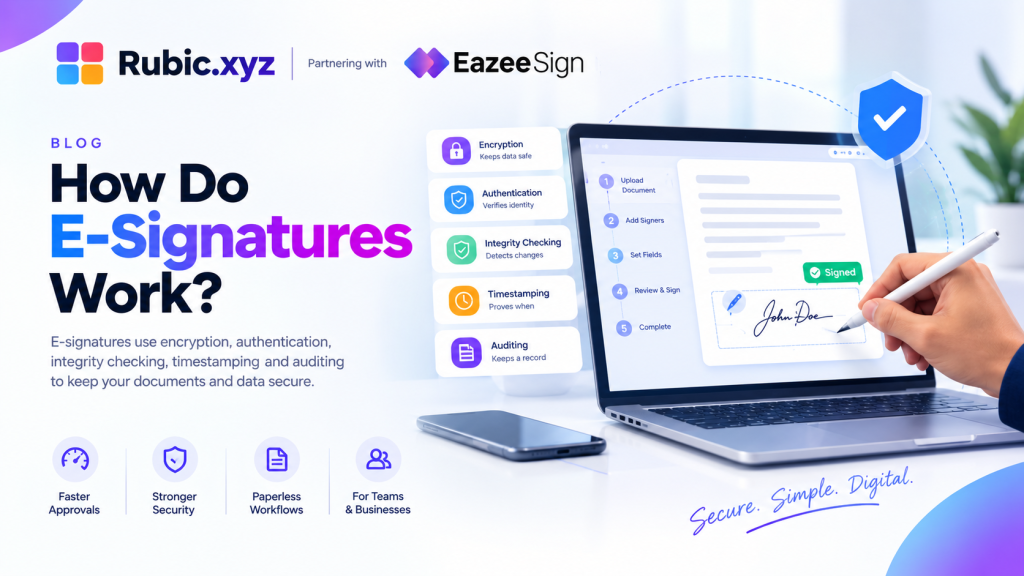
The actual question is “How do e-signatures work?” Almost all electronic signature services make use of encryption, authentication, integrity checking, timestamping and auditing to achieve this. When combined, all these features ensure that both the data and the process of signing are secure.
Why E-Signature Security Matters
An electronic signature is more than an image of one’s handwriting pasted into an agreement. In a secure environment, such a signature will be associated with relevant data about the document, signatory and transaction – information which may prove useful for future review of the agreement.
Many employment contracts, financial deals, supply agreements and many other documents contain confidential and binding information. This means that any access to them by unauthorised people or their alteration should raise serious concern.
This is why e-signatures must provide protection on several fronts at once: information protection, authentication, detection of alterations and retention of evidence.
How Do E-Signatures Work?
To get a clear idea about the working of e-signature, one must first consider how the process of signing takes place. Here, the document is uploaded, the recipients are identified, signing fields are designated and the document is put through a defined workflow from then on.
Based on the software that is being used, the recipient could be required to prove his identity using an email link, password, access code or anything else. Upon signing the document, the software records all necessary information and ensures the document’s security.
Cryptographic controls ensure that the document has not been modified after the signing. Meanwhile, the audit trail keeps record of all actions taken against the document such as its access, authentication and signing.
Practical Signing Workflow
A secure signing process typically plays out like this:
- Document preparation: The sender uploads the final document, adds the fields that need filling in and identifies who needs to sign.
- Secure delivery: The platform sends the signing invitation, so recipients access the document through the intended workflow rather than some side channel.
- Signer authentication: The recipient goes through whatever authentication the transaction calls for — this could be as light as email verification or as strict as multi-factor authentication or identity checks.
- Document review and signing: The signer reads through the agreement, fills in what’s needed and applies their signature.
- Integrity protection: Security mechanisms lock in the signed state of the document, which helps reveal any changes made after the fact.
- Audit trail creation: Key events get logged in order, building a running history of the transaction.
- Secure storage: The finished document and its records get stored based on the organization’s retention and access rules.
This is really what “how do e-signatures work” comes down to — it’s not just clicking a signature box. Each step adds another layer of control.
Encryption Protects Documents and Data
Encryption basically entails scrambling of the data so that the recipient has to decrypt the data using a key. Encryption is applied in e-signature software for data transmission and storage.
| Security measure | Primary purpose | How it supports e-signatures |
| Encryption in transit | Protects moving data | Reduces exposure during transmission |
| Encryption at rest | Protects stored data | Helps safeguard saved documents |
| Authentication | Verifies access | Helps prevent unauthorized signing |
| Integrity controls | Detects changes | Helps identify document alterations |
| Audit trails | Records activity | Creates a history of signing events |
| Access controls | Limits permissions | Restricts unnecessary document access |
Encryption matters, but it’s not a standalone fix — it works alongside authentication, access management, monitoring and secure storage.
Digital Signatures Help Protect Document Integrity
Though it is common practice to use words like “electronic signature” and “digital signature” synonymously, the two words do differ. An e-signature is an electronic form of signature or approval which could be just about anything. The digital signature is a step up since it uses cryptography to ensure authenticity and integrity of the document signed.
The presence of any kind of manipulation performed on the document after its signing will be detected by the cryptographic process.
What Is an Audit Trail E-Signature?
A signature tells you someone completed the act of signing. It doesn’t necessarily tell you what led up to that moment. That’s where the audit trail comes in.
So what is an audit trail e-signature, in practical terms? It’s a chronological log of everything significant that happened around an electronic signing transaction — delivery, access, authentication, signing, completion and other workflow events, depending on the platform.
What an Audit Trail May Record
- Document activity: When the document was sent, opened or completed — building a timeline of the transaction.
- Signer activity: Details tied to the recipient’s authentication and their signing action.
- Time and transaction events: Timestamps that pin down when things happened, especially useful once multiple people are involved.
- Workflow changes: Events like a declined, cancelled or reassigned request, alongside completion.
How Audit Trails Strengthen Digital Trust
An audit trail earns its keep when a signed document gets reviewed long after the fact. If someone questions whether an agreement was properly approved, the transaction history can show when it was delivered, opened, authenticated and signed.
It won’t settle every dispute on its own, but it does provide evidence about how the signing actually unfolded. That’s why explaining e-signature security properly means covering both the technical safeguards and the transaction records — not just one or the other.
Authentication Helps Confirm the Signer
Protecting the document is only half the job. Organizations also need some confidence that the person signing is actually who they’re supposed to be. That’s what authentication controls are for. Common approaches include:
- Email verification: A controlled signing invitation is sent to the email address that the signer has provided. Can be used for less risk-prone processes, but often insufficient in case of something more important.
- Password or access codes: Additional authentication measure that limits access to the signing process itself.
- Multi-factor authentication: Needing more than just one factor makes it harder for the person to steal the account.
- Identity verification: In case of risky operations, additional verification may be required before signing.
The right method really just depends on how sensitive the document is and what’s at stake in the transaction.
Tamper Detection and Signed Document Integrity
A signed agreement shouldn’t be quietly changed after the fact. If key terms could be altered without anyone noticing, the whole signing process wouldn’t mean much. Cryptographic integrity mechanisms tie the document to its signature, so verification systems can spot changes made after signing.
That doesn’t mean agreements can never be updated — organizations can still create revised versions when needed. The point is that a revision should go through its own review and signing process, rather than silently overwriting an existing signed record.
E Signature Security Explained Through Multiple Layers
The simplest approach to the security of the digital signature is that it should be perceived as an interconnected system rather than a particular tool. Encryption provides for the security of the data. Authentication checks for the access. The integrity tools protect the signed document. The audit trail preserves the history of the process.
It cannot be done without any of the tools. An e-signing platform with excellent encryption requires good authentication, reasonable permissions, document management and logging capabilities.
What Businesses Should Check Before Choosing a Platform
Pricing and interface polish matter, but they shouldn’t be the whole decision — the security underneath the platform matters just as much.
Worth checking:
- Data protection: How are documents protected in transit and in storage?
- Audit capabilities: What events and details actually show up in the audit trail?
- Access management: Can administrators set permissions based on user roles?
- Authentication options: Are stronger verification methods available for sensitive transactions?
- Document integrity: How does the platform detect changes to a signed document?
- Retention and retrieval: How are completed documents and records stored and accessed down the line?
Running through these helps businesses land on a platform that actually fits their workflow and the sensitivity of what they’re signing.
Legal Considerations for Electronic Signatures
Technical security and legal validity are related, but they’re not the same thing. Whether an electronic signature holds up legally can depend on jurisdiction, the type of transaction, consent, authentication and recordkeeping requirements.
So organizations should think about the whole signing process, not just whether a signature exists. Proper authorization, secure records, access controls and transaction evidence all contribute to a more dependable workflow.
Understanding what an audit trail e-signature actually captures matters here too — that history can back up how an agreement was delivered and completed.
Conclusion
E-signatures have revolutionized the way organizations execute contracts and their security is not provided by just having the e-signature itself. The encryption of the data, the authentication of the user, the integrity controls to detect any alterations and an audit trail are some examples of the measures used.
How are e-signatures secure then? By using multiple controls and not just one. Once businesses understand these layers, they’re in a much better position to make smart calls about signing platforms, document access, authentication and record keeping.
A reliable e-signature process brings all of this together — making digital signing faster without cutting corners on the security and traceability that important business documents need.